
Avaza Support
  1. Home
  2. Knowledge Base
  3. General
  4. User / Account Management
  5. Switch Between Accounts
  1. Home
  2. Knowledge Base
  3. General
  4. Switch Between Accounts
Searching...

Switch Between Accounts

Click on the User Profile icon in the top right of the app screen, and you will see an option to switch between accounts.

Switch Between AccountsFigure: Switch Accounts Using User Profile Icon on Top-Right 

The next screen will show you all the Avaza accounts you can switch over to.
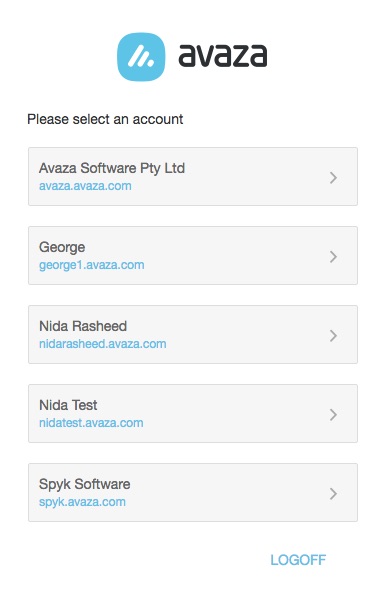
Switch Between AccountsFigure: Choose Avaza Account To Log Into

If you cannot see a particular Avaza account, it may not be linked to the same email address as your other Avaza accounts. In that case, you will need to log out and log in again using the other email address you’re using.

Updated on January 21, 2023

Was this article helpful?

Yes No

Related Articles

  • Single Sign-On (SSO) & Login Enforcement
  • Reset Multi-Factor Authentication (MFA) for a User
  • What is the difference between Project Manager and Portfolio Manager roles?
  • Can I add a new contact with an email address that is used by an existing contact?
  • Avaza Multi-factor Authentication
  • Avaza Branding

Related Articles

  • Recurring Schedule Bookings
  • Track Every Important Task Update with the New History Tab
  • Single Sign-On (SSO) & Login Enforcement
  • Embedding External Content with the iFrame Dashboard Widget
  • Avaza MCP Server
© Copyright Avaza Support.
  • Avaza
  • Support Home
  • Contact