
We’re excited to introduce the new History tab within Task Details in Avaza.
The new History view gives you a clear audit trail of task activity, helping teams understand exactly what changed, who changed it, and when.
This makes task tracking more transparent, improves accountability, and makes it easier to review project activity over time.
Where to Find the History Tab
Open any task in Avaza and look at the right-side panel.
You’ll now see two tabs:
- Comments — for task discussions and collaboration
- History — for task activity tracking and audit history
The Comments tab remains the default view when opening a task.
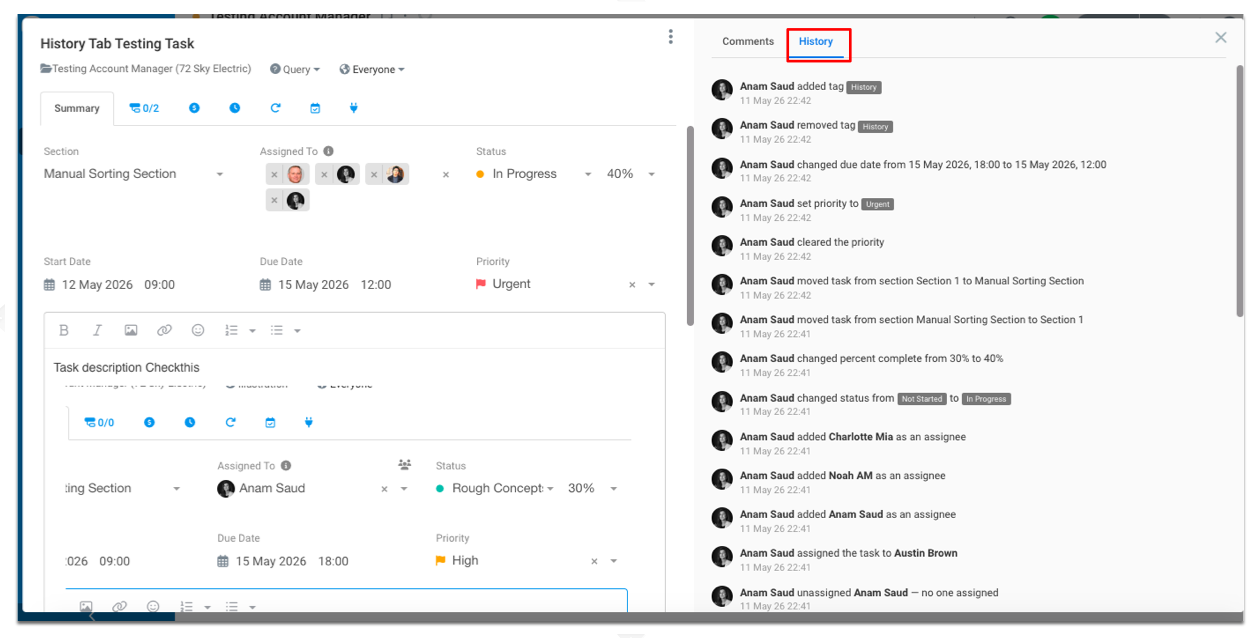
What You Can See in Task History
The History tab records important task updates including:
- Task creation
- Status changes
- Task completion
- Assignee updates
- Due date changes
- Start date changes
- Priority updates
- Estimated hours changes
- Task renames
- Section moves
- Project moves
- Task type changes
- Tag updates
- Follower updates
- Attachment activity
- Description updates
Each history item clearly shows:
- Who made the change
- What changed
- When the change occurred
Examples of History Events
Here are some examples of activity entries you may see:
- Anam Saud created the task
- John Smith changed status from In Progress to Complete
- Sarah Lee assigned the task to Michael Brown
- Alex Green changed due date from 15 May 2026 to 20 May 2026
- Emma Wilson added tag Urgent
- David Jones attached design-final.pdf
Improved Visibility Without Extra Clicks
Previously, only a small “Task Created by…” entry appeared at the bottom of the Comments panel. As comments grew, this information became difficult to find.
The new History tab provides a dedicated and organized timeline of task activity, making it much easier to:
- Review task progress
- Understand decision history
- Track responsibility and ownership
- Audit changes over time
- Troubleshoot unexpected updates
Comments and History Kept Separate
The new layout keeps collaboration and audit tracking separate:
- Use the Comments tab for conversations and updates
- Use the History tab to review task changes and activity logs
When viewing the History tab, the comment input field is hidden to keep the interface focused and easy to scan.
Optimized for Performance
The History feed is loaded progressively as you scroll, ensuring fast performance even on long-running tasks with extensive activity history.
Newest activity always appears first so you can quickly see the latest changes.
Better Task Transparency Across Teams
The new Task History tab gives teams better visibility into how work evolves over time and helps everyone stay aligned on task ownership, status changes, and project activity.